Showing posts with label .NET Framework. Show all posts

Friday, June 9, 2017

Public SMS Message Repository

Public SMS Message Repository

Introduction

This project enables an individual use a mobile phone to store a short message "in the cloud", that can be picked up by others using their mobile phone.
This project will demonstrate how to:
  • use the Twilio TwiML API to respond to SMS messages;
  • use XML as a data store;
  • have some political fun along the way.

Before we get started, see the application in action. Using your mobile phone, SMS (text) bush to +1 530 PROJECT (as in Code Project, or +15307765328).
Note: The demo does not allow addition/change/deletion of messages.

Background

My softball team had a problem. If a game was cancelled or rescheduled due to rain (or hail), it was difficult to relay the message to all the players quickly. They would drive to the ball park, only to learn about the cancellation.
This project, written in 2012, and rewritten for this article, is a solution. It works like this:
  1. The team captain sets a message by sending a message to the application:
    set rainout bingo July 5 @ 10:00 Today's games are cancelled.
  2. The application responds:
    rainout set: July 5 @ 10:00 Today's games are cancelled.
  3. Players can check the status by sending a machine to the application:
    rainout
  4. The application responds:
    July 5 @ 10:00 Today's games are cancelled.

How it Works

Twilio is a telephony gateway. It bridges data and voice between the internet, POTS, and 3GPP networks. By setting up an account with Twilio, calls and messages be be directed to and from an assigned number.
This project uses a simple API, called TwiML. It's use is very simple:
  1. A phone number is associated with a web application by specifying the URI of the application.
  2. When the number receives a message, an HTTP POST is made to the specified URI as application/x-www-form-urlencoded, containing data and metadata.
  3. The application responds to the request with an XML document (TwiML), containing instructions on how to respond.
  4. The response is relayed back to the requestor.

Inside the Code

https://www.codeproject.com/KB/Articles/996504/Sms.png
In this example I have used IIS/ASP.NET to act as the HTTP server and scripting interface. Incoming requests are handled by overriding the Render method of the Default Page class. If a form is POSTed with a Bodyparameter, the Controller is invoked.

Controller

Examples of valid request messages are:
  • bush
  • set greeting bingo Thanks for stopping by!
  • greeting
  • delete greeting bingo
ParseTwilioRequest uses a regular expression to split the message into its components.
// Parse the twilio request.
string command = string.Empty, message = null, password = null, key = null;
var matches = Regex.Match(request, "^(?<command>[^ ]+) (?<key>[^ ]+) (?<password>[^ ]+)(?: (?<message>.*))?$|^(?<command>[^ ]+)(?: (?<values>.*))?$");
The possible message components are:
command
A verb/instruction. This is the only required component. Valid commands are any stored key, hellopingsetdelete, and bush.
password
If performing a set or delete command, a password is required. The password is specified by Repository.Password.
key
If performing a set or delete command, the key of a key/message pair. The key must match a pattern, specified by Repository.KeyPattern.
message
If performing a set or delete command, the message of a key/message pair.
If no components are present, or the command is invalid, a default message is returned.

Repository

The application uses and XML file as a data repository, abstracted by the Repository class. It subclasses XDocument, and provides properties and methods to manipulate its data.
<?xml version="1.0" encoding="utf-8" standalone="yes"?>
<repository password="bingo" pattern="[a-zA-Z0-9]{3,10}">
  <default>Reply with [hello|bush|{0}]. +1530PROJECT brought to you by Red Cell Innovation Inc.</default>
  <message key="foo">bar</message>
  <message key="rainout">July 5 @ 1000 Today's games are cancelled.</message>
</repository>

Bushisms

Just for some fun, a bush request invokes Bushisms.GetRandom() for a random Dubya quote.

Deployment

  1. Copy the provided files to your web server.
  2. Open a Twilio account (you'll receive some free credit).
  3. Order a telephone number.
  4. In the telephone number configuration, assign the URI of your application the to the SMS callback.
  5. Test, and use Twilio's alerts panel to debug.
Once your credit expires, this project will cost:
  • about USD 1.00 per month for a telephone number;
  • about USD 0.0075 (¾¢) per message sent or received.

Security Considerations

For my use, security was not a major concern. Keep in mind:
  • The password, used to set and delete messages is stored in plain text in the repository.xml file, so are the messages.
  • To secure the application, it should be configured on a server that uses SSL/TLS (HTTPS) to encrypt the transport of messages between Twilio and the web server.
  • By design, messages can be retrieved from the store using only a keyword.

Contribute

How could you use this application? What other use cases can you imagine? Add your response below.

Conclusion

This project demonstrates how to build a simple SMS application without the use any external libraries or dependencies.
I am not affiliated with Twilio. This article is not an endorsement for Twilio. Twilio is one telephony gateway, and there are many others. Each may offer different services, at different costs.
Note: Offering a working demo for this article has real costs. The cost of this demonstration is sponsored by Red Cell Innovation Inc. If you require development of a telephony or mobile application, please consider us.

History

  • May 31, 2015 – First publication

Download Source Code


Google Translate Desktop Application in C#.NET

Google Translate Desktop Application in C#.NET


Introduction

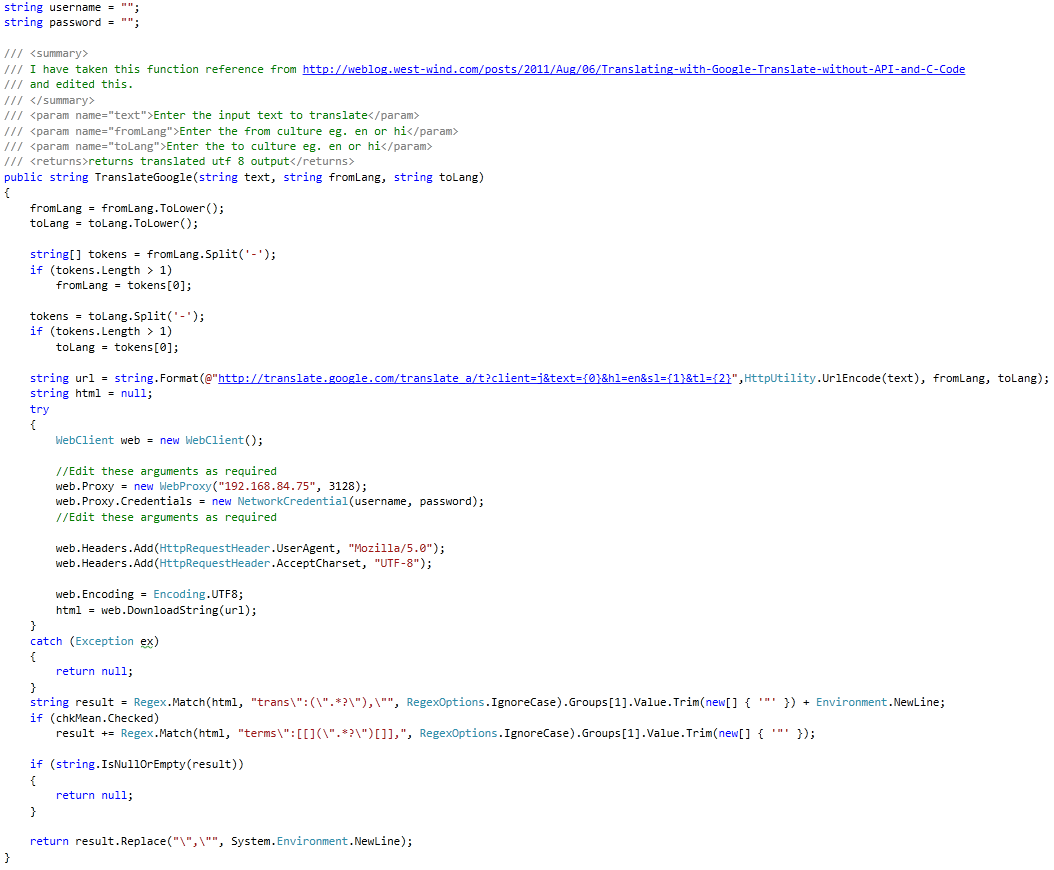
This tip demonstrates how to implement Google translate in your C# application without purchasing its API.
Points of Interest are:
  • We are using Google translate service so an internet connection is required.
  • We are sending HTTP requests like a browser does.
  • We are parsing the output and displaying result.
Features of Application are:
  • Grabs input string from clipboard as soon as application starts or its window is actived.
  • Language change option is available in context menu on each textbox.
  • Translate while typing.
  • Shows single or all meanings of given word.
  • Shows meaning with corresponding sentence surrounded with [ ].

Snapshots

Using the Code

I am using http://translate.google.com/translate_a url.

Points of Interest

This code is edited by me and more features are added to make a handy translator. I hope this will help readers.

History

  • Version 1.0 - GoogleTranslateDesk

Download Source Code

Google Translator C#

Google Translator C#

What is it?

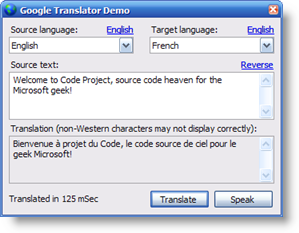
GoogleTranslator in actionGoogleTranslator is an object that allows you to translate text using the power of Google's online language tools. The demo app also allows you to easily perform a reverse translation. The app can be used as a poor man's resource translator for simple phrases, but you'd be wise to confirm the translation with a native speaker before using the results.

How do I use it?

You use GoogleTranslator by constructing it and calling its Translate() method.
 
    using RavSoft.GoogleTranslator;
    
    Translator t = new GoogleTranslator();
    string translation = t.Translate ("Hello, how are you?", "English", "French");
    Console.WriteLine (translation);
    Console.WriteLine ("Translated in " + t.TranslationTime.TotalMilliseconds + " mSec");
    Console.WriteLine ("Translated speech = " + t.TranslationSpeechUrl);

How it works

GoogleTranslator works by directly invoking Google's translation API called by its online translation form and parsing the results.
 
    // Initialize
    this.Error = null;
    this.TranslationSpeechUrl = null;
    this.TranslationTime = TimeSpan.Zero;
    DateTime tmStart = DateTime.Now;
    string translation = string.Empty;

    try {
        // Download translation
        string url = string.Format ("https://translate.googleapis.com/translate_a/single?client=gtx&sl={0}&tl={1}&dt=t&q={2}",
                                    Translator.LanguageEnumToIdentifier (sourceLanguage),
                                    Translator.LanguageEnumToIdentifier (targetLanguage),
                                    HttpUtility.UrlEncode (sourceText));
        string outputFile = Path.GetTempFileName();
        using (WebClient wc = new WebClient ()) {
            wc.Headers.Add ("user-agent", "Mozilla/5.0 (Windows NT 6.1) AppleWebKit/537.36 " +
                                          "(KHTML, like Gecko) Chrome/41.0.2228.0 Safari/537.36");
            wc.DownloadFile(url, outputFile);
        }

        // Get translated text
        if (File.Exists (outputFile)) {

            // Get phrase collection
            string text = File.ReadAllText(outputFile);
            int index = text.IndexOf (string.Format(",,\"{0}\"", Translator.LanguageEnumToIdentifier (sourceLanguage)));
            if (index == -1) {
                // Translation of single word
                int startQuote = text.IndexOf('\"');
                if (startQuote != -1) {
                    int endQuote = text.IndexOf('\"', startQuote + 1);
                    if (endQuote != -1) {
                        translation = text.Substring(startQuote + 1, endQuote - startQuote - 1);
                    }
                }
            }
            else {
                // Translation of phrase
                text = text.Substring(0, index);
                text = text.Replace("],[", ",");
                text = text.Replace("]", string.Empty);
                text = text.Replace("[", string.Empty);
                text = text.Replace("\",\"", "\"");
            }

            // Get translated phrases
            string[] phrases = text.Split (new[] { '\"' }, StringSplitOptions.RemoveEmptyEntries);
            for (int i=0; (i < phrases.Count()); i += 2) {
                string translatedPhrase = phrases[i];
                if (translatedPhrase.StartsWith(",,")) {
                    i--;
                    continue;
                }
                translation += translatedPhrase + "  ";
            }

            // Fix up translation
            translation = translation.Trim();
            translation = translation.Replace(" ?", "?");
            translation = translation.Replace(" !", "!");
            translation = translation.Replace(" ,", ",");
            translation = translation.Replace(" .", ".");
            translation = translation.Replace(" ;", ";");

            // And translation speech URL
            this.TranslationSpeechUrl = string.Format ("https://translate.googleapis.com/translate_tts?ie=UTF-8&q={0}&tl={1}&total=1&idx=0&textlen={2}&client=gtx",
                                                       HttpUtility.UrlEncode (translation),
                                                       Translator.LanguageEnumToIdentifier (targetLanguage),
                                                       translation.Length);
        }
    }
    catch (Exception ex) {
        this.Error = ex;
    }

    // Return result
    this.TranslationTime = DateTime.Now - tmStart;
    return translation;
As you can see, the logic used to parse the JSON result is very simple!

Speaking the translation

The Translator object retrieves the URL that will stream the spoken version of the translation. The demo app speaks this content by navigating to this URL in a hidden browser control. As mentioned in the preamble, because Google limits the speech to common words in a few languages, don't be surprised if the demo plays dumb when you try to speak your translated text!

Revision History

  • 18 Mar 2016
    Switched to Google Translate plugin APIs.  Fix identified by User-12366202.  Thank you!
  • 6 Aug 2015
    Corrected parsing logic.  Fix identified by Member 11019371.  Thank you!
  • 6 May 2015
    Corrected parsing logic to fix translation of single words.
  • 5 May 2015
    Corrected Google URL.
    Removed all external dependencies.
  • 9 Mar 2014
    Switched to using Google's JSON translation APIs.
    Added TranslationTime and TranslationSpeakUrl properties.
    Tweaked demo app UI to assist in reverse translation and resetting an English source and target.
  • 13 Jan 2013
    Added support for current full language set.
    Refixed bug that limited translation to first sentence.
    Fixed a bug that caused reverse translation to fail when accented characters were present.
  • 10 Mar 2010
    Added support for current full language set.
    Fixed bug that limited translation to first sentence.
  • 15 Feb 2010
    Even more parsing tweakage.
  • 28 Mar 2009
    More parsing tweakage.
  • 20 Mar 2007
    Tweaked parsing logic to conform to changes at Google's website.
  • 15 Jan 2006
    Initial version.

Download Source Code


Thursday, August 25, 2016

NHẬN DẠNG LỜI NÓI TRONG C#

 
NHẬN DẠNG LỜI NÓI TRONG C#

Giới thiệu

Máy tính được thiết kế để phục vụ cho con người, thật buồn nếu con người phải đi học ngôn ngữ của máy tính để “thuyết phục” máy tính làm việc cho mình. Ngành khoa học máy tính vẫn đang phát triển nhiều công nghệ để việc giao tiếp giữa con người và máy tính trở nên dễ hơn, tự nhiên và thân thiện với con người hơn. Một trong những kênh giao tiếp quan trọng chính là giao tiếp bằng lời.
Ngày hôm nay, chúng ta sẽ cùng nhau tìm hiểu về cách để nhận dạng lời nói trong C#, Thư viện mà chúng ta sẽ sử dụng là System.Speech. Qua bài viết ngày hôm nay, các bạn sẽ có thể viết được nhiều hơn một ứng dụng nhận biết từ mà người dùng đang nói là gì.

  • Windows 8
  • Windows Server 2012
  • Windows 7
  • Windows Vista SP2
  • Windows Server 2008 (Server Core Role not supported)
  • Windows Server 2008 R2 (Server Core Role supported with SP1 or later; Itanium not supported).
  • Windows Vista SP1 or later
  • Windows Server 2008 (Server Core not supported)
  • Windows Server 2008 R2 (Server Core supported with SP1 or later)
  • Windows Server 2003 SP2
  • Windows XP SP2
  • Windows Server 2008 R2
  • Windows Server 2008
  • Windows Server 2003
  • Windows 98, Windows Server 2000 SP4
  • Windows CE
  • Windows Millennium Edition
  • Windows Mobile for Pocket PC
  • Windows Mobile for Smartphone
  • Windows XP Media Center Edition
  • Windows XP Professional x64 Edition
  • Windows XP SP2
  • Windows XP Starter Edition

Môi trường và thư viện

  • Ngôn ngữ lập trình : C#
  • Thư viện System.Speech, thư viện này nằm trong bộ .Net framwork 4.5, 4, 3.5, 3.0 và .NET 4 Client Profile
  • Công cụ : Visual Studio
  • Windows 8, windows 7, windows vista

Thư viện System.Speech

Các bạn có thể đọc kỹ về thư viện này tại trang của Microsoft : http://msdn.microsoft.com/en-us/library/gg145021(v=vs.110).aspx
Thư viện này  thư viện này nằm trong bộ .Net framwork 4.5, 4, 3.5, 3.0 và .NET 4 Client Profile. Nó chứa các class được viết sẵn để hỗ trợ chúng ta nhận dạng lời nói.
Để thêm thư viện này vào project bạn làm như trong hình
Ảnh Thêm thư viện vào project

Bắt đầu code

Trong bài viết này, mình sẽ tạo một ứng dụng windows form, Mình đổi tên file form1.cs thành frmMain.cs. sau khi thêm thư viện ở bước trên, nhưng đoạn code từ đây về sau sẽ đặt ở file frmMain.cs
Bây giờ chúng ta sẽ gọi các namespace cần dùng vào.
1
2
using System.Speech.Recognition;
using System.Speech.Synthesis;
Trong class frmMain, ta sẽ khai báo một attribute tên _recognizer
1
private SpeechRecognitionEngine _recognizer = null;
Trong hàm khởi tạo frmMain
1
2
3
4
5
_recognizer = new SpeechRecognitionEngine(); //Khởi tạo một instance
_recognizer.SpeechRecognized += _onSpeechRecognized; // Sự kiện nhận dạng thành công
_recognizer.SpeechRecognitionRejected += _onSpeechRejected; // Sự kiện nhận dạng thất bại
_recognizer.SetInputToDefaultAudioDevice(); // Cài đặt thiết bị input là thiết bị mặc định
_recognizer.RecognizeAsync(RecognizeMode.Multiple);
Chúng ta sẽ tự định nghĩa các phương thức _onSpeechRecognized và _onSpeechRejected, các phương thức này sẽ được gọi lên khi các sự kiện SpeechRecognized, SpeechRecognitionRejected  xảy ra. Chúng ta sẽ định nghĩa hai phương thức này ở phần khác.
Trong dòng _recognizer.RecognizeAsync(RecognizeMode.Multiple), nếu RecognizeMode.Single thì _recognizer sẽ nhận dạng một tiếng, sau đó ngưng hoạt động.
Tiếp theo chúng ta sẽ định nghĩa nhưng mẫu để so sánh với âm thanh thu vào từ mic, từ đó sẽ đưa ra được những từ mà người dùng vừa nói
1
2
_recognizer.RequestRecognizerUpdate();
_recognizer.LoadGrammar(new Grammar(new GrammarBuilder("test")) { Name = "testGrammar" });  _recognizer.LoadGrammar(new Grammar(new GrammarBuilder("demo")) { Name = "demoGrammar" }); _recognizer.RequestRecognizerUpdate();
Sau đọan code trên, thì trong danh sách mẫu của _recognizer sẽ chỉ có hai tiếng  là “demo” và “test”.
Lúc tạo grammar, bạn có thể cung cấp name của grammar để sử dụng trong một số trường hợp mà chuỗi text của bạn khá phức tạp, sẽ nói ở phần sau. Tuy nhiên, nếu bạn không muốn để tên thì có thể code như sau
1
_recognizer.LoadGrammar(new Grammar(new GrammarBuilder("demo")));
Khi người dùng đọc vào tiếng “demo”, và _recognizer nhận dạng được thì phương thức _onSpeechRecognized sẽ được gọi.
Nếu text nhận dạng không phải là “test” hoặc “demo” thì phương thức _onSpeechRejected sẽ được gọi.
Theo cách ở trên thì bạn sẽ chỉ nhận dạng được một vài tiếng cố định. Bạn có thể làm như sau để nhận dạng được nhiều tiếng hơn, đây là những tiếng được microsoft định nghĩa sẵn cho chúng ta.
1
_recognizer.LoadGrammar(new DictationGrammar());
Phương thức xử lý các sự kiện
01
02
03
04
05
06
07
08
09
10
11
12
13
14
15
16
17
private void _onSpeechRecognized (object sender, SpeechRecognizedEventArgs e)
 {
 if (e.Result.Text == "test" || e.Result.Text == "demo")
 {
 MessageBox.Show("Recognized : " + e.Result.Text);
 }
 }
private void _onSpeechRejected (object sender, SpeechRecognitionRejectedEventArgs e)
 {
 string result = "Speech rejected. Did you mean:";
 foreach (RecognizedPhrase r in e.Result.Alternates)
 {
 result += "\n" + r.Text;
 }
 MessageBox.Show(result);
 }
Nếu thất bại thì _recognizer sẽ trả về cho bạn những tiếng gần với input nhất có trong danh sách mẫu. Trong ví dụ này, bạn nói tiếng “mo” thì nó cũng sẽ trả về cho bạn “demo”. Có lẽ khi viết thư viện này, microsoft xác định rằng nó phục vụ cho việc điều khiển máy tính, chứ không phải để nhập liệu chính xác.
Nhưng trong ví dụ trên, mỗi một Grammar chúng ta chỉ để một tiếng, chúng ta muốn cùng một grammar mà để nhiều tiếng, thì sử dụng class tên Choices, Grammar kiểu choice sẽ cho phép chúng ta liệt kê ra nhiều tiếng, khi nhận dạng, nó sẽ nhận dạng một trong những tiếng này :
1
_recognizer.LoadGrammar(new Grammar(new GrammarBuilder(new Choices("dog","cat","snake"))) { Name = "animalGrammar" });

Nhận dạng một câu

Để có thể nhận dạng được một mẫu câu, ví dụ như “test demo” thì bạn làm như sau :
1
2
3
4
5
6
7
GrammarBuilder grammarBuilder = new GrammarBuilder();
grammarBuilder.Append("I"); // add "I"
grammarBuilder.Append(new Choices("like", "dislike")); // load "like" & "dislike"
grammarBuilder.Append(new Choices("dogs", "cats", "birds", "snakes",
 "fishes", "tigers", "lions", "snails", "elephants")); // add animals
_recognizer.RequestRecognizerUpdate();
_recognizer.LoadGrammar(new Grammar(grammarBuilder)); // load grammar
Khi nhận dạng, thì nó sẽ cố nhận dạng thành một câu, nếu tiếng đầu tiên là I, tiếng tiếp theo là Like và dogs, thì nó sẽ cho bạn một câu là “I like dogs”.
Có trường hợp bạn nói rõ tiếng I, dogs, nhưng không rõ like hay dislike, thì phương thức _onSpeechRejected  sẽ được gọi, và trong e.Result.Alternates sẽ chứ hai câu là “I like dogs” và “I dislike dogs”
Để lấy từ từ trong câu, bạn có thể gọi e.Result.Words[i]

Tải về

http://www.codeproject.com/KB/audio-video/483347/StartingWithSpeechRecognition.zip

Tài liệu tham khảo :

  • System.Speech Namespaces : http://msdn.microsoft.com/en-us/library/gg145021(v=vs.110).aspx
  • http://www.codeproject.com/Articles/483347/Speech-recognition-speech-to-text-text-to-speech-a